Make your own › Christmas word search maker › Guide
Make your own Christmas word search maker
You don't need to know how to code. You describe each part to a free AI assistant such as Claude, ChatGPT or Gemini, paste what it writes into a file, and open it in your browser. Want to see the finished one first? Try the Christmas word search maker.
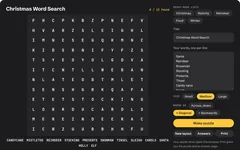 Try the finished Christmas word search maker →
Your own Christmas puzzle maker, in under an hour
You describe the maker to a free AI assistant, such as ChatGPT, Claude or Gemini, paste what it writes into a file, and open it in your browser. No coding needed. Yours can have snow falling behind the grid, a holly border on the printout and a secret Christmas message hidden in the leftover letters.
Build it in four steps
Ask for a Christmas word search maker
Copy this prompt into your AI assistant:
Copy this promptI don't know how to code. Please make me a Christmas word search maker that runs in a web browser. Requirements: - ONE single HTML file (HTML, CSS and JavaScript together), no external libraries, no internet needed. I will save it and double-click it. - A text box where I type my words, one per line. Make everything capitals and ignore spaces inside a word. - Five buttons that fill the box with ready-made lists: Christmas, Nativity, Santa's reindeer, Christmas food and Winter. - A "Make puzzle" button that hides every word in a 12 by 12 grid, across, down or diagonally, and fills the rest with random letters. Tell me kindly if a word won't fit. - A festive look: deep green background, red and gold accents and gentle snow falling behind the grid. - A "Show answers" button and a "New layout" button. Please give me the complete file in one code block, then tell me in simple steps how to save and open it.
Paste the code into your text editor, save it as christmas-word-search.html, then double-click it.
Make it print nicely
Copy this promptPlease add a "Print" button. The printout should show only the title, the grid and the word list on one A4 page, with a thin holly border drawn in CSS, in a way that still looks good in black and white. Add a second page with the answers shaded. Send me the complete updated file.
Tip: choose Save as PDF in the print window to email it to the family or the school office.Play it on screen
Copy this promptPlease make the puzzle playable: drag across letters in a straight line (with a mouse or a finger on a tablet) to select a word. A correct word stays highlighted and is crossed off the list with a little jingle made with the Web Audio API. When every word is found, show "Merry Christmas!" with the time taken. Send me the complete updated file.
Hide a secret Christmas message
Copy this promptPlease add an optional "Secret message" box. Put its letters into the leftover empty squares in reading order instead of random letters, so once every word is found, the leftover letters spell the message (for example "SANTA IS COMING"). Print a hint under the puzzle: "Find every word, then read the leftover letters." Send me the complete updated file.
Twist it into something else
Advent puzzle calendar
24 small puzzles, one unlocked each day in December
Christmas cracker puzzles
tiny grids sized to roll up inside a cracker, with a joke as the secret message
Christmas word scramble
jumble the same festive words for a second puzzle
Thank-you note puzzle
hide "THANK YOU" and the present's name for the grandparents