Make your own › Word scramble maker › Guide
Make your own word scramble maker
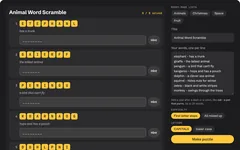
You don't need to know how to code. You describe each part to a free AI assistant such as Claude, ChatGPT or Gemini, paste what it writes into a file, and open it in your browser. Want to see the finished one first? Try the word scramble maker.
 Try the finished word scramble maker →
Your own word scramble generator
You'll describe the generator to a free AI assistant, paste what it writes into a file, and open it in your browser. No coding needed, and once it works you can change anything about it just by asking.
- A box for your words, with an optional clue after each one
- Jumbled letters shown as tiles, and a box to type each answer
- An easy mode that keeps the first letter in place
- A hint button that gives away one letter at a time
- A printable worksheet with answer lines, plus an answer key
Good for: weekly spelling lists, topic vocabulary, a baby shower or party game, language learners, and a quick brain teaser for grown-ups.
What you need
Build it in five steps
Step 1 gives you a simple version that works, and each step after it adds more. Yours will look a bit different from the one above, because the AI writes its own version each time.
Ask for the word scramble maker
Copy this prompt into your AI assistant:
Copy this promptI don't know how to code. Please make me a word scramble maker that runs in a web browser. Requirements: - ONE single HTML file (HTML, CSS and JavaScript together), no external libraries, no internet needed. I will save it and double-click it. - A text box where I type my words, one per line. - A "Make puzzle" button that jumbles the letters of each word. Make sure a jumbled word never comes out the same as the real word. - Show each jumbled word as a row of big letter tiles, numbered, with a box next to it to type the answer. - When the answer is right, turn the row green. When every word is solved, show a well done message. Please give me the complete file in one code block, then tell me in simple steps how to save and open it.
Copy the code, paste it into your text editor and save it as word-scramble.html. Double-click it, type a few words and press Make puzzle.
Add clues
Copy this promptThat works, thank you. Please let me add a clue to any word by typing it after a dash, like "cat - a pet that purrs". Show the clue in italics under that word's tiles. Words without a dash have no clue. Send me the complete updated file.
Always ask for the complete file. Replace everything in word-scramble.html, save, and refresh the tab (F5 or Cmd+R).Add difficulty and hints
Copy this promptPlease add: - A difficulty choice: Easy keeps the first letter of each word in place, Hard mixes up every letter. - A "Hint" button on each row that fills in the next correct letter of the answer. - A choice of CAPITALS or lower case letters, for younger children who are still learning capitals. Remember my words and choices in localStorage. Send me the complete updated file.
Make it print as a worksheet
Copy this promptPlease add a "Print" button. The printout should be a clean black and white worksheet on A4: the title, one line of instructions, then a numbered list with the jumbled letters spaced out, the clue in italics, and a line underneath to write the answer. Put the answers on a second page. Hide everything else when printing. Send me the complete updated file.
Tip: choose Save as PDF in the print window to keep a copy or send it to a class.Add ready-made lists
Copy this promptPlease add four buttons that fill the word box with a ready-made list and make the puzzle straight away: Animals, Christmas, Space and Fruit, eight to ten words each, with a short, child-friendly clue for every word. Send me the complete updated file.
Quick fixes
Some words come out unjumbled
Ask the AI: "Keep shuffling each word until it's different from the original, unless every letter is the same."
My answer is right but it says wrong
It's probably a capital letter or a space. Ask the AI to "ignore capitals, spaces and punctuation when checking an answer".
Phrases like "candy cane" get mixed together
Ask the AI to "jumble each word of a phrase separately and keep a gap between them".
The printout runs onto two pages
Ask the AI to "use two columns when printing more than 10 words".
It opens as text
Re-save as plain text with exactly .html at the end, not .txt.
Twist it into something else
Race against the clock
a timer and a leaderboard for the class
Baby shower scramble
baby words, a pastel printout and a prize for the fastest guest
Drag the tiles
swap letter tiles into order instead of typing
Language practice
French or Spanish words, with the English as the clue
Secret sentence
the first letters of the answers spell a hidden message
Anagram challenge
how many smaller words can you make from one big one?