Make your own › Solitaire › Guide
Make your own solitaire game
You don't need to know how to code. You describe each part to a free AI assistant such as Claude, ChatGPT or Gemini, paste what it writes into a file, and open it in your browser. Want to see the finished one first? Try the solitaire game.
 Try the finished solitaire game →
Your own solitaire game
You'll describe it to a free AI assistant, paste what it writes into a file, and open it in your browser. No coding needed, and you can give it your own card backs, colours and rules.
Build it in five steps
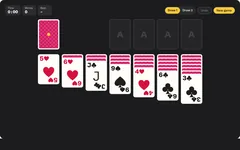
Step 1 gives you a table with cards on it, and each step after it adds more. Yours will look a bit different from the one above, because the AI writes its own version each time.
Deal the cards
Copy this prompt into your AI assistant:
Copy this promptI don't know how to code. Please make me a Klondike solitaire card game that runs in a web browser. For this first version: - ONE single HTML file (HTML, CSS and JavaScript together), no external libraries, no image files, no internet needed. I will save it and double-click it. - A dark green table. Draw the cards with HTML and CSS: white cards with rounded corners, the rank and suit in the top-left corner, and a big suit symbol in the middle. Hearts and diamonds red, spades and clubs black. Face-down cards show a patterned back. - Shuffle a 52-card deck and deal it the Klondike way: seven columns with 1 to 7 cards, only the bottom card of each face up, fanned downwards so you can see each card's corner. - The rest of the cards go in a face-down deck in the top-left corner, with a space beside it for turned-over cards, and four empty spaces in the top right for the Ace piles. - Clicking the deck turns over one card. When the deck is empty, clicking it turns the pile back over. - A "New game" button. Please give me the complete file in one code block, then tell me in simple steps how to save and open it.
Copy the code, paste it into your text editor and save it as solitaire.html. Double-click it, then click the deck to turn some cards over.
Move cards by dragging
Copy this promptThat works, thank you. Now let me move cards, following the rules: - Drag a face-up card with the mouse or a finger (use pointer events so it works on touch screens too). If I drag a card in a column, the cards below it come along. - On a column, a card can go on one that is one higher and the other colour. Only a King can go in an empty column. - On the Ace piles, start with an Ace, then the same suit going up. Only one card at a time. - When I let go, drop the cards on whichever allowed pile they overlap most. If none, slide them back. - When the last face-up card leaves a column, turn the card below it face up. - Make the cards slide smoothly when they move. Send me the complete updated file.
Always ask for the complete file. Replace everything in solitaire.html, save, and refresh the tab (F5 or Cmd+R).Tap to move, and undo
Copy this promptPlease add: - Tapping or clicking a card (without dragging) moves it to the best place: an Ace pile if it fits, otherwise a column it fits on. If it can't go anywhere, give it a little shake. - An "Undo" button that goes back one move at a time, all the way to the start. Ctrl+Z (Cmd+Z on a Mac) does the same. - A move counter and a timer that starts on the first move. Send me the complete updated file.
Add Draw 3 and winning
Copy this promptPlease add: - "Draw 1" and "Draw 3" buttons. In Draw 3, clicking the deck turns over three cards, shown slightly fanned, and only the top one can be played. - When every card is face up and the deck is used up, move the rest of the cards onto the Ace piles by themselves, one at a time, lowest first. - When all four Ace piles reach the King, show "You won!" with the time and moves, and a "Deal again" button. - Remember my best time for Draw 1 and Draw 3 separately in localStorage, and show it next to the timer. Send me the complete updated file.
Make it work well on a phone
Copy this promptPlease make it fit any screen: - Work out the card width from the table's width so all seven columns always fit, from a small phone to a big monitor (no wider than 100 pixels). Size the corner rank and suit from the card width so they stay readable. - If a column gets too long for the screen, squeeze the face-up cards closer together. - Re-measure when the window is resized or the phone is turned. - Stop the page scrolling while I drag a card on a phone. - Save the game in localStorage after every move, so if I close the tab and come back, my game is still there. Send me the complete updated file.
To try it on your phone, put the file online for free with this hosting guide, or email it to yourself and open it there.
Quick fixes
Cards don't drag on my phone
Ask the AI: "Use pointer events (pointerdown, pointermove, pointerup) instead of mouse events, and add touch-action: none to the cards so the page doesn't scroll while I drag."
A dragged card disappears under other cards
Ask the AI to "give the dragged cards a very high z-index while they are moving, and put the normal order back when they land".
It lets me make moves that break the rules
Describe the exact move, such as "it let me put a red 5 on a red 6", and ask the AI to check the colour and the rank before allowing a move.
Undo puts cards back wrong
Ask the AI to "save a copy of every pile, including which cards are face up, before each move, and have Undo put that copy back".
The suits show as coloured emoji
Some phones turn ♥ and ♦ into emoji. Ask the AI to "draw the four suit symbols as small SVG shapes instead of text characters".
It opens as text
Re-save as plain text with exactly .html at the end, not .txt.
Twist it into something else
Your own card backs
a photo, your team colours or a pattern you design
Spider solitaire
two decks and ten columns, building runs of one suit
FreeCell
every card face up, with four free spaces to park cards
Daily deal
the same shuffle for everyone each day, with best times
Hint button
shows a good move when you're stuck
Big-card mode
extra large cards and numbers for easier reading