Make your own › Online theremin › Guide
Make your own online theremin
You don't need to know how to code. You describe each part to a free AI assistant such as Claude, ChatGPT or Gemini, paste what it writes into a file, and open it in your browser. Want to see the finished one first? Try the online theremin.
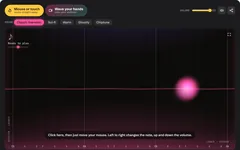 Try the finished online theremin →
Your own theremin that you play by waving your hands
You'll describe the theremin to a free AI assistant, paste what it writes into a file, and play it. It's built in six stages, and the webcam stage is the most ambitious thing on this site, but you still won't write any code yourself.
- A big glowing play area: left to right is the note, up and down is the volume
- A theremin sound made entirely by code, with natural vibrato, echo and reverb, and five sounds to choose from
- Snap to notes (major, minor pentatonic, blues and more), so it's easy to play in tune
- A visualiser that draws the real shape of the sound, with glowing trails
- Webcam mode: wave your hands to play, with the video staying on your computer
- A Record button with WAV download, a "play a tune" guide, two-finger touch and keyboard controls
Good for: anyone curious about what a theremin sounds like, families wanting spooky sounds for Halloween, music teachers explaining pitch and volume, and anyone who's built the virtual piano or beat maker and wants a bigger challenge.
What you need
The trick to bigger builds
Big projects go wrong when you ask for everything at once. The AI tries to do too much, something breaks, and it's hard to tell what. So this guide builds the theremin in stages. After each stage, check it works and save a copy (theremin-v1.html, theremin-v2.html and so on). If a change goes badly, open the last good copy, paste it back into the chat and say "Let's go back to this version."
Build it in six steps
Step 1 gives you a simple version that works, and each step after it adds more. The demo on the online theremin page is roughly what you'll have once you've done every step. Yours will look a bit different, because the AI writes its own version each time.
Ask for a mouse theremin
Start with the simplest theremin there is: one tone that follows your mouse. Copy this prompt into your AI assistant:
Copy this promptI don't know how to code. Please make me an online theremin that runs in a web browser. Requirements: - Everything in ONE single HTML file (HTML, CSS and JavaScript together), so I can save it and double-click it. - No external libraries, no sound files, no internet connection needed. Make the sound with the Web Audio API. - A big dark play area that fills most of the window. Moving the mouse from left to right changes the pitch, from C3 on the left to C6 on the right. Each note should take up the same width, so work in notes (semitones), not in hertz. - Moving up and down changes the volume: loud at the top, silent at the bottom. - Browsers only allow sound after a click, so start the sound when I first click the play area. After that it plays whenever the mouse is over the play area, and goes quiet when the mouse leaves. - Use one sine wave oscillator that runs all the time. Change its frequency and volume smoothly with setTargetAtTime (about 0.04 seconds), so it glides between notes and never clicks. - Show the name of the nearest note (like A4) and the frequency in hertz in big letters in a corner. Please give me the complete file in one code block, then tell me in simple steps how to save and open it.
Save it as theremin.html and double-click it. Click the dark area and move your mouse slowly from side to side. Then save a copy as theremin-v1.html.
No sound? Browsers only allow sound after you click something on the page, so click the play area first. Check your volume, then tell the AI exactly what happens.Make it sound like a real theremin, and add scales
A plain sine wave sounds like a test tone. A few quiet harmonics, a vibrato that behaves like a real hand, and some echo turn it into an instrument. Snapping to a scale makes it much easier to play a tune.
Copy this promptThat works, thank you. Now please make it sound like a real theremin and easier to play in tune: - Replace the plain sine wave with a PeriodicWave: mostly the fundamental, plus quiet 2nd, 3rd and 4th harmonics, for a warm, slightly reedy tone. - Add vibrato with a second oscillator (an LFO, about 5.5 times a second) connected to the main oscillator's detune. Make it behave like a real player's hand: almost no vibrato while I'm sliding between notes, then it gently blooms over half a second when I hold a note still. - Add an echo (a DelayNode with feedback through a low-pass filter) and a reverb (a ConvolverNode with an impulse response made in code from about 3 seconds of fading random noise). Put a compressor at the very end so it never distorts. - Five sound buttons: Classic, Sci-fi (pure tone, wide fast vibrato, lots of echo), Warm (more harmonics through a low-pass filter), Ghostly (two slightly detuned oscillators, slow vibrato, huge reverb) and Chiptune (square wave, very quick glide). Each one sets the sliders below. - Sliders for Vibrato, Glide, Echo and Reverb, plus a master Volume slider and a Mute button. - A "Snap to notes" choice: Off (smooth, like a real theremin), Chromatic, Major, Minor pentatonic and Blues, with a menu for the key (C to B). When snapping is on, round the pitch to the nearest note in the scale, but keep the glide so it still swoops from note to note. - A Range choice: Low (C2 to C5), Middle (C3 to C6), High (C4 to C7) and Wide (C2 to C7). - Draw faint vertical lines in the play area for every note, brighter for the notes in the chosen scale, and label each C (C3, C4 and so on). Send me the whole updated file, not just the changed parts.
Always ask for the whole file. Then you replace everything, save, and refresh the browser tab (F5, or Cmd+R on a Mac). Happy with the sound? Save a copy as theremin-v2.html.Add a glowing visualiser
This is the part that makes people say "how did you make that?" The line you see is the real shape of the sound, so it changes with every preset.
Copy this promptPlease add a glowing visualiser to the play area: - An AnalyserNode connected to the theremin's sound before the echo and reverb. Every frame, draw the actual waveform across the middle of the play area as a glowing line. Find where the wave crosses zero going upwards and show about two and a half cycles, so the shape stands still and I can see it change with each sound. - A soft glowing orb where the mouse is, bigger when it's louder, with a fading trail behind it. Fade the old picture out a little each frame instead of clearing it, so movements leave light trails. - Little sparks that fly off the orb when I move quickly. - A different glow colour for each sound, and a background that glows softly in that colour too. - Use requestAnimationFrame, and keep the canvas sharp on high-resolution screens (devicePixelRatio). - The visualiser is part of the instrument, so keep it running even if my computer is set to reduce motion. If prefers-reduced-motion is on, only turn off the sparks. Send me the complete updated file.
Play it by waving your hands
Now the clever part, and the reason this is an Advanced project. There's no AI and no face detection here. The page takes a snapshot of you with your hands down, then looks for whatever has changed since. The highest changed spot in each box is your hand.
Copy this promptNow please add a "Wave your hands" button that lets me play the theremin with my webcam, like a real theremin's two antennas. No AI, no libraries, no downloads: plain JavaScript only. - When I press the button, ask for the camera with getUserMedia (front camera, 640 by 480, no microphone). Show the video behind the play area, mirrored like a mirror and faded, so I can see myself. - Draw two dashed boxes over the video: PITCH on the right of the screen and VOLUME on the left. My right hand's height in the Pitch box sets the note (higher hand, higher note). My left hand's height in the Volume box sets the volume, and the volume stays where I left it when I take that hand away. When my right hand leaves the Pitch box, the sound fades out. - Tracking: for each new video frame, draw the mirrored video into a tiny hidden canvas (about 96 pixels wide) and read its pixels. - Calibrate first: show a 3, 2, 1 countdown saying "Hands down and keep still", then take about 20 frames and store the median colour of each pixel as the background. The median ignores anything that moves past. - After that, a pixel counts as "hand" if its colour is further from the background than a threshold. First subtract the median difference across the whole picture, so the camera's automatic brightness changes don't fool it. Ignore lone pixels by needing at least 4 of their 8 neighbours to count as well. - In each box, the hand is the highest group of "hand" pixels (the top of a raised hand). Use the average position of the hand pixels in a thin band just below that top point. - Smooth the hand position with a One Euro filter, so it's steady when I hold still but quick when I move. Only decide a hand has arrived after 2 frames in a row, and that it has gone after about 8 frames without it. - Let the background slowly follow changes in the room, and recalibrate by itself if most of the picture suddenly changes. Add a Recalibrate button and a Sensitivity slider. - Draw a dot on each hand it finds, tint the changed pixels pale pink so I can see what the camera notices, and show "Pitch hand: found" and "Volume hand: found". - Show a note saying the camera picture is only looked at on this computer and is never recorded, saved or sent anywhere. Never upload anything. - If the camera is blocked, missing or being used by another app, show a friendly message and go back to mouse mode. Add a Stop camera button that really turns the camera off. Send me the complete updated file.
Press Wave your hands, allow the camera, and sit about an arm's length away with your face in the middle. Keep your hands down until it says Ready, then raise your right hand into the Pitch box and move it up and down.
Light matters. It works best with light on your face and hands, not a bright window behind you. If the dot jumps about, press Recalibrate and keep still while it counts. Save a copy as theremin-v4.html once it works.Record and download what you play
Copy this promptPlease add a Record panel: - A Record button that records exactly what I hear (after the echo, reverb and volume), up to 60 seconds, with a timer. Press it again to stop. - Capture the sound with an AudioWorklet loaded from a Blob URL made in the code (so there are no extra files), and fall back to a ScriptProcessorNode in browsers without AudioWorklet. - When I stop, turn the recording into a 16-bit stereo WAV file in the browser. Add a "Play back" button, and a "Download WAV" button that saves it as my-theremin.wav. - Keep everything on my device. Don't upload it anywhere. Send me the complete updated file.
A WAV file opens in almost anything: GarageBand, Audacity, a video editor, or just your music player. Try recording a sci-fi "flying saucer landing" for a home movie.
Polish: two fingers, keyboard, play a tune and phones
Copy this promptPlease polish it: - Touch: use pointer events so a finger works on phones and tablets, and a second finger plays a second voice at the same time. Set touch-action: none on the play area. - Keyboard: when the play area is focused, Space starts and stops a note, the left and right arrows move one note (one scale note when snapping is on), up and down change the volume, and M mutes. Make every button work with the Tab key, with a visible focus ring. - A "Play a tune" panel with tunes that are free to use: Twinkle, Twinkle, Little Star; Ode to Joy; Frère Jacques; and the chorus of Jingle Bells. Store each as a list like "C4 C4 G4 G4 A4 A4 G4:2". When I press Start, the next note glows as a lane in the play area, with a strip of upcoming note names and a progress bar. Holding the right note for a moment moves on. For a repeated note, let me dip down and back up, or just keep holding. Add a "Listen first" button that plays the tune on the theremin while the glow moves. - On iPhone, create and resume the AudioContext inside my first tap, play a silent sound, and set navigator.audioSession.type to "playback" where it exists. If the tab is hidden, fade all sound out so nothing gets stuck. - Save my sound, sliders, scale, key and range in localStorage. - A full screen button for the play area, and make the whole page fit nicely on a phone with no sideways scrolling. Send me the complete updated file.
To play your theremin on your phone or share it with friends, put it online for free. See Putting your project online for free. Phones only allow the camera on pages served over https, which free hosting gives you.
Quick fixes
No sound on iPhone
First, flip the ring/silent switch on the side of the phone, as it can silence web pages. If it's still quiet, ask: "There's no sound on my iPhone. Please create and resume the AudioContext inside my first tap, play a short silent buffer, and set navigator.audioSession.type to 'playback' where the browser supports it."
It clicks or crackles when I move
The AI is probably setting the frequency or volume directly. Ask: "Please change frequency and volume only with setTargetAtTime, never by setting .value while it plays, and add a compressor at the end."
The sound keeps playing after I stop
Ask:
Sometimes the theremin keeps playing when it should stop. Please fade the volume to zero on pointerleave, pointerup, pointercancel and lostpointercapture, when the camera loses my pitch hand, and when the window loses focus or the tab is hidden. Send me the complete fixed file.
The camera doesn't start
Look for a camera icon in the address bar and choose Allow. Some browsers only allow the camera on web pages served over https, so if double-clicking the file doesn't work, try Chrome or Edge, or put it online for free with our hosting guide. Close any video-call app that might be using the camera.
The hand dot jumps around
Turn on a light in front of you, keep bright windows out of the picture, and press Recalibrate while keeping still. Lower the Sensitivity if it finds hands that aren't there, or raise it if it misses you. You can also ask: "The hand tracking is jumpy. Please smooth it more when my hand is nearly still, and ignore groups of fewer than 15 changed pixels."
It thinks my head or shoulders are a hand
Sit back a little so your head is in the middle, between the two boxes, and recalibrate with your hands down. Or ask: "Please make the two boxes narrower, so they only cover the outer third of the picture on each side."
The page is blank
The AI's reply was probably cut off. Scroll to the bottom of its code: it should end with </html>. If not, ask: "Your code was cut off. Please send the complete file again." For a long file, you can ask it to "send the file in two parts and tell me exactly where to join them".
You want to see the error the browser is hiding
Press F12 (or Cmd+Option+I on a Mac), click the Console tab and copy any red text into the chat.
Twist it into something else
Once the hand tracking works, your webcam can play all sorts of things:
Air drums
Draw four boxes on the camera picture. Hitting one with your hand plays a drum, so you can drum in the air.
Haunted doorway
Point the camera at the front door for Halloween. When someone walks past, it plays a ghostly theremin howl.
Two-player duet
Two people, one on each side of the camera, each controlling their own voice in harmony.
Sci-fi sound effects maker
Buttons for a flying saucer landing, a laser and a robot, each one a recorded theremin swoop you can download.
Pitch-matching game
It plays a note, you find it with your hand, and it scores how close you got. Great ear training.
Colour organ
Each note paints the screen a different colour, for a party light show on a big TV.
Made something you're proud of? Share it and tag us. We feature reader projects.
The spookiest instrument, made from one wave
There are a few theremins online, but most are a box you drag your mouse across. Building your own shows you that the eeriest instrument there is comes down to one wave whose pitch and loudness follow your hand. It also shows you how a plain webcam can become a motion sensor by asking one simple question, again and again: "what's changed since a moment ago?" And it's proof that you can make something genuinely clever by asking for it one stage at a time.